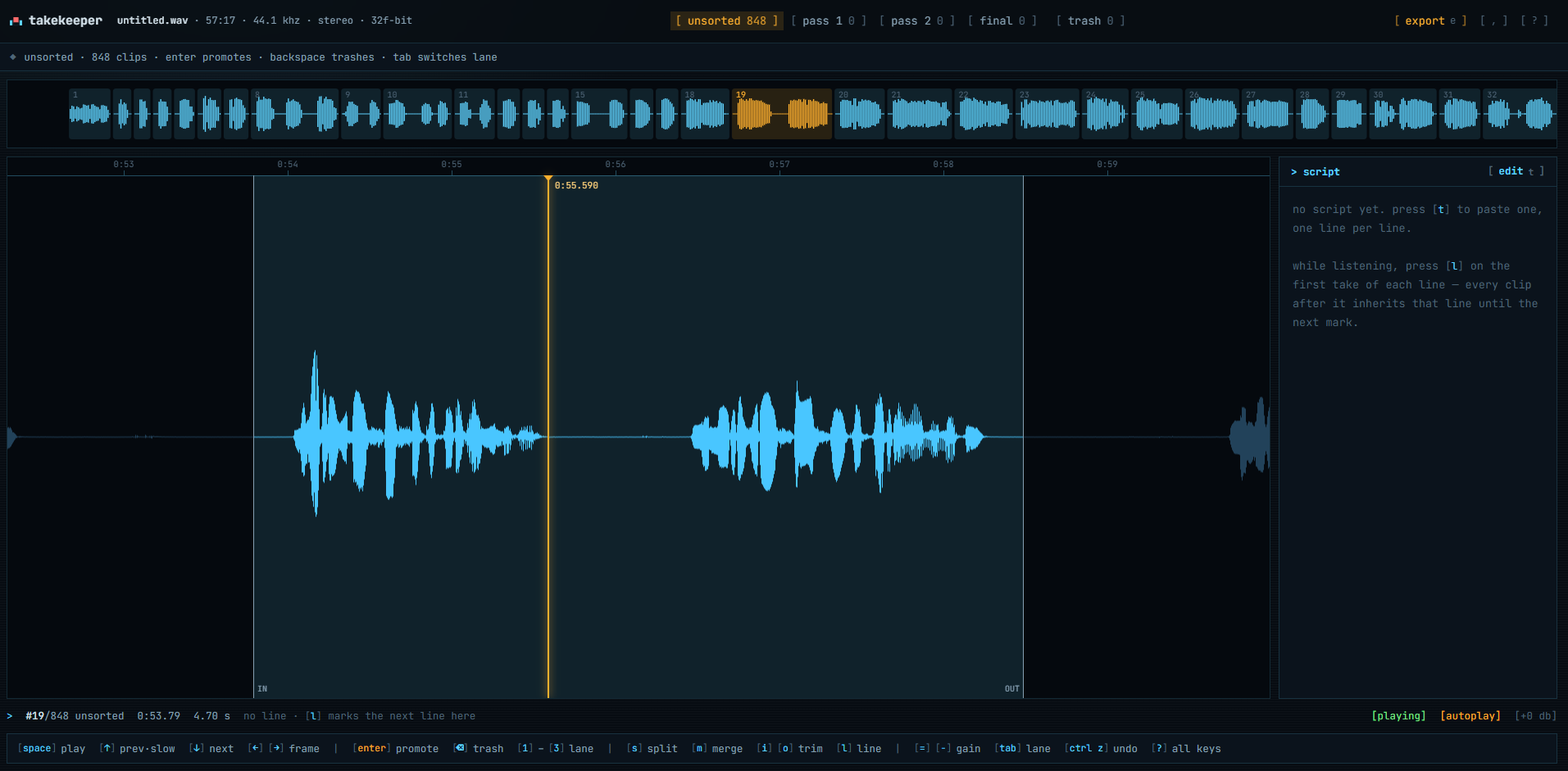
made for one job
takekeeper is a take-selection tool for voice actors. you record a session in one long file: take after take, with silence in between. takekeeper turns that file into individual takes, works out which line of your script each one is, and gives you a keyboard-only way to keep the good ones, line by line, in as many passes as you need, without ever touching a timeline.
it is built for voice-over sessions, audiobook narration, dubbing and adr, character reads, auditions, and pickups, in spanish and english: anything where you need to split a voice recording at the silences, hear every take of a line together, and end up with a clean folder of keepers for your daw.
how it works
drop the session
a wav of any length. the silences between takes are detected in seconds and every take becomes a clip in the unsorted lane. paste the script, pick your character.
let it read the takes
press w and whisper transcribes every take on your own gpu, inside the page. each take is matched to one of your lines; breaths and slates go to a junk lane; a take with two reads in it is cut in two.
sort, line by line
walk your lines with the count of takes per pass on each. takes autoplay; enter promotes one to the next lane, backspace trashes it. second pass on pass 1, third on pass 2, until final holds one per line.
export the keepers
the final lane becomes numbered wav files in script order, line number in the name, silent gaps between them, written straight into a folder, ready to shift-drop onto one track in fl studio, or into reaper, audition, pro tools.
what it does
detection built for takes
800 takes in an hour is the normal case. threshold, minimum silence and margin are adjustable; re-detect never loses your sorting.
transcription on your gpu
whisper runs in the browser via webgpu. the model downloads once; your audio never leaves the machine. about twelve minutes for an hour of takes.
every take knows its line
takes are matched to the script in recording order, so a line you went back for still lands where it belongs. doubtful matches are flagged; u walks them.
junk lane
breaths, slates and false starts with no words move out of your way on their own, into a lane you review with the same two keys. it never takes a line's last take.
cuts fixed by ear and by word
a take that repeats its line is re-cut at the pauses, and where there is no pause, between the words. false starts are separated; a line a pause split in two is joined back.
lanes instead of layers
the multi-pass selection you already do by dragging clips between tracks, without the dragging. configurable lanes, counts on every tab and on every line.
keyboard first, mouse too
every action is a key, placed so a whole session can be sorted with one hand. every key is also a button.
fix the cuts yourself
replay slow, step by a frame, split, merge a miscut back together, set a new start or end. undo everything.
sessions that come back
lanes, cuts, lines and transcripts are saved as you work; every recording you touched is listed here to resume or discard. ctrl s writes a project file you can drop back in anywhere.
private, bit-exact
no upload, no account. exported takes are byte-for-byte slices of your recording, in its own bit depth, with a 5 ms fade at each cut.
keys
everything acts on the clip under the amber playhead. every key is also a button in the toolbar.
| space / shift space | play–pause / play the take from its start in slow motion |
| ↑ / ↓ | previous / next take |
| ← → | move the playhead · shift: one frame, precise · alt: a tenth |
| home / end | take start / end |
| enter / shift enter | promote to next lane / demote |
| backspace | trash; the lane closes up |
| 1…9 0 | send to lane n / back to unsorted |
| tab / shift tab | next / previous lane, junk and trash included |
| = / - | monitor gain up / down, never exported |
| s / shift s | split at playhead, staying on the first half / the second |
| m / shift m | merge with next / previous |
| i / o | set take start / end at playhead |
| g | line mode: one line's takes at a time |
| shift ↑ shift ↓ | in line mode: previous / next line |
| l / shift l | continue the script here / jump to a line number |
| [ / ] | this take: one line back / forward |
| t | edit the script |
| w | transcribe takes and match them to lines |
| u | next doubtful line match |
| a / r | toggle autoplay / loop the current take |
| ctrl z / ctrl shift z | undo / redo |
| ctrl s / ctrl o | save the project file / open a file or project |
| e · , · ? | export · settings · key reference |
| esc | stop / close |
into your daw
- fl studio: sort the exported folder by name, select all, hold shift while dropping onto the playlist: one track, in order, with the silent gap files (three quarters of a second after each take, one and a half between lines, both adjustable) already in place. turn on ripple edit so deleting a clip closes the gap.
- reaper: select the files in the media explorer, insert as one track sequentially (insert → as one track, sequentially).
- audition / pro tools / logic: import the folder; the numbering keeps everything chronological. or export one merged wav with a fixed gap between takes.
faq
is my recording uploaded anywhere?
no. takekeeper reads the file straight from your disk inside the browser, and transcription runs on your own gpu inside the page. there is no server, no account and no upload; the only downloads are the app and, once, the speech model.
how long can the recording be?
wav files can be any length: an hour-long 24-bit session with 800 takes loads in a few seconds and uses almost no memory, because clips are references into the original file, not copies. compressed formats (mp3, flac, ogg, m4a) are decoded in memory, so keep those under about 25 minutes or convert to wav first.
how does it find the takes?
it measures the level of every 20 ms frame and cuts wherever the audio stays below a threshold for longer than the minimum silence. short breaths and pauses inside a take are left alone, and a margin of room tone is kept on both sides. threshold, minimum silence and margin are adjustable and you can re-detect at any time. after transcription, takes that contain two reads are cut again at the pause between them, or between the words when there is none.
how does transcription work, and how long does it take?
whisper runs in your browser through webgpu, so it needs chrome or edge and a gpu. the model downloads once and is cached: small (about 410 mb) is the safe choice for spanish, base (about 140 mb) is twice as fast and a little rougher. on a mid-range gpu an hour of takes transcribes in roughly twelve minutes, and you can keep sorting while it runs. each take is then matched to one of your lines in recording order, breaths and slates go to the junk lane, and takes with several reads are re-cut.
what if it matches a take to the wrong line?
doubtful matches carry a mark and u walks through them; [ and ] move a take one line back or forward while you listen. if you change your character or fix a typo in the script, "re-match lines" in the transcribe dialog redoes the matching from the stored transcripts in a second, without the gpu.
can i use it without transcription?
yes. paste the script and press l on the first take of each of your lines while listening; every take after it inherits that line until the next mark. [ and ] fix a take you went back for, and line mode with counts works the same either way.
what is the junk lane?
after transcription, takes with no words in them (breaths, slates, a cough, a false start that never got to a word) move to the junk lane instead of staying in your way. review it like any lane: backspace confirms, enter rescues to unsorted. it never takes a line's last remaining take, so no line goes silent by accident.
what if a cut lands in the wrong place?
every take shows the audio around it, so you can step the playhead by a frame and set a new start or end, split a take in two, or merge it back with its neighbour, which restores the original audio between them. everything has undo.
will my sorting survive closing the tab?
yes. lanes, cuts, line marks, transcripts and where you were are saved in the browser as you work, and every recording you touched is listed on this page to resume or discard. if you re-export or rename the recording, takekeeper looks for a saved session with the same length and picks it up. for anything you care about, press ctrl s: it writes a small .takekeeper.json next to the wav that you can drop on this page any time, in any browser.
which browsers work?
chrome and edge on desktop get everything, including transcription, saving straight into a folder, and reopening your session with one click. firefox sorts fine but downloads a zip and has no webgpu, so transcription falls back to the cpu and is slow. it is a keyboard tool, so phones and tablets are not the target.
can i install it like an app?
yes. in chrome or edge on the desktop the address bar shows an install button, and takekeeper then opens in its own window with no browser tabs. after the first visit the app itself works offline, and the speech model stays cached from the first time you transcribe. same app either way, same sessions.
can i record directly in takekeeper?
not yet. record in your usual chain (your interface and daw do it better) and drop the wav here. recording pickups in the browser is on the list.